Currency selection on products
Guide for setting a custom price on a product in a chosen currency
TABLE OF CONTENTS
The product tab
When currency is activated in Telaris, the 'Valuta' tab becomes visible on the product card.
Here the active currencies in the system are shown, and you can set a custom price in a currency on a product, or let the exchange rate control the price.
To set a currency as active, it must be enabled for products under 'Innstillinger - Valuta', and then the 'Aktiv i produkter' checkbox must be checked.
Example:
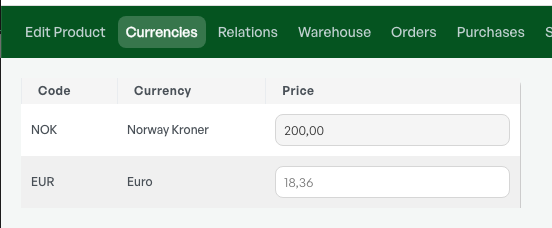
If a customer with currency in EUR buys the product below, the price will be 18.36 EUR and follows the exchange rate.
Example:
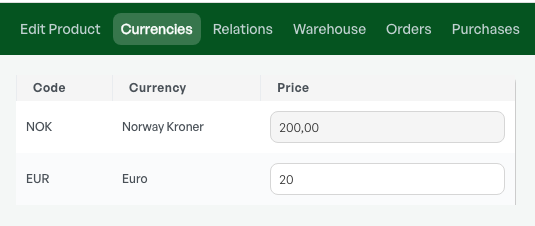
If a customer with currency in EUR buys the product below, the price is manually set to 20 EUR.
Product class
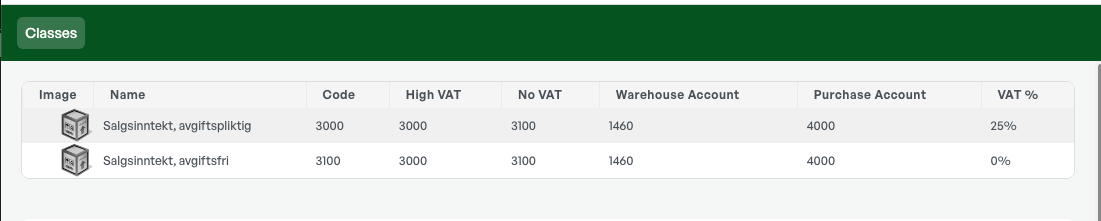
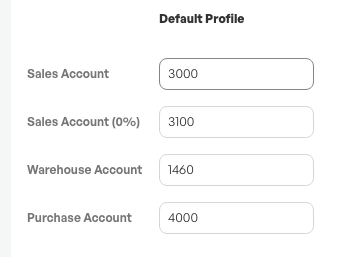
When products are sold VAT-free abroad, the product class must be set up with a VAT-free account.
Tip: Telaris fetches a new exchange rate daily.
NOTE: To see the currency tab and set a custom price, currency must be activated in Telaris. Contact Telaris support to activate currency.
Guide: Setting a default currency on a customer
Was this article helpful?
That’s Great!
Thank you for your feedback
Sorry! We couldn't be helpful
Thank you for your feedback
Feedback sent
We appreciate your effort and will try to fix the article