Troubleshooting - Tripletex Accounting
This article explains three common errors in Tripletex Accounting: account not found, missing payment type, and payments not being imported back to Telaris.
TABLE OF CONTENTS
- Troubleshooting - Tripletex Accounting
- Introduction to troubleshooting
- Review of common errors
- Summary and further troubleshooting
Introduction to troubleshooting
Errors in Tripletex Accounting are often due to missing or incorrect configuration between Telaris and Tripletex.
The most common causes are that an account number does not exist in Tripletex, that payment type mapping is missing, or that payment import is not enabled or does not find relevant invoices.
This article covers three common support scenarios:
Account not found in Tripletex
Payment type not found
Payment is not imported back to Telaris
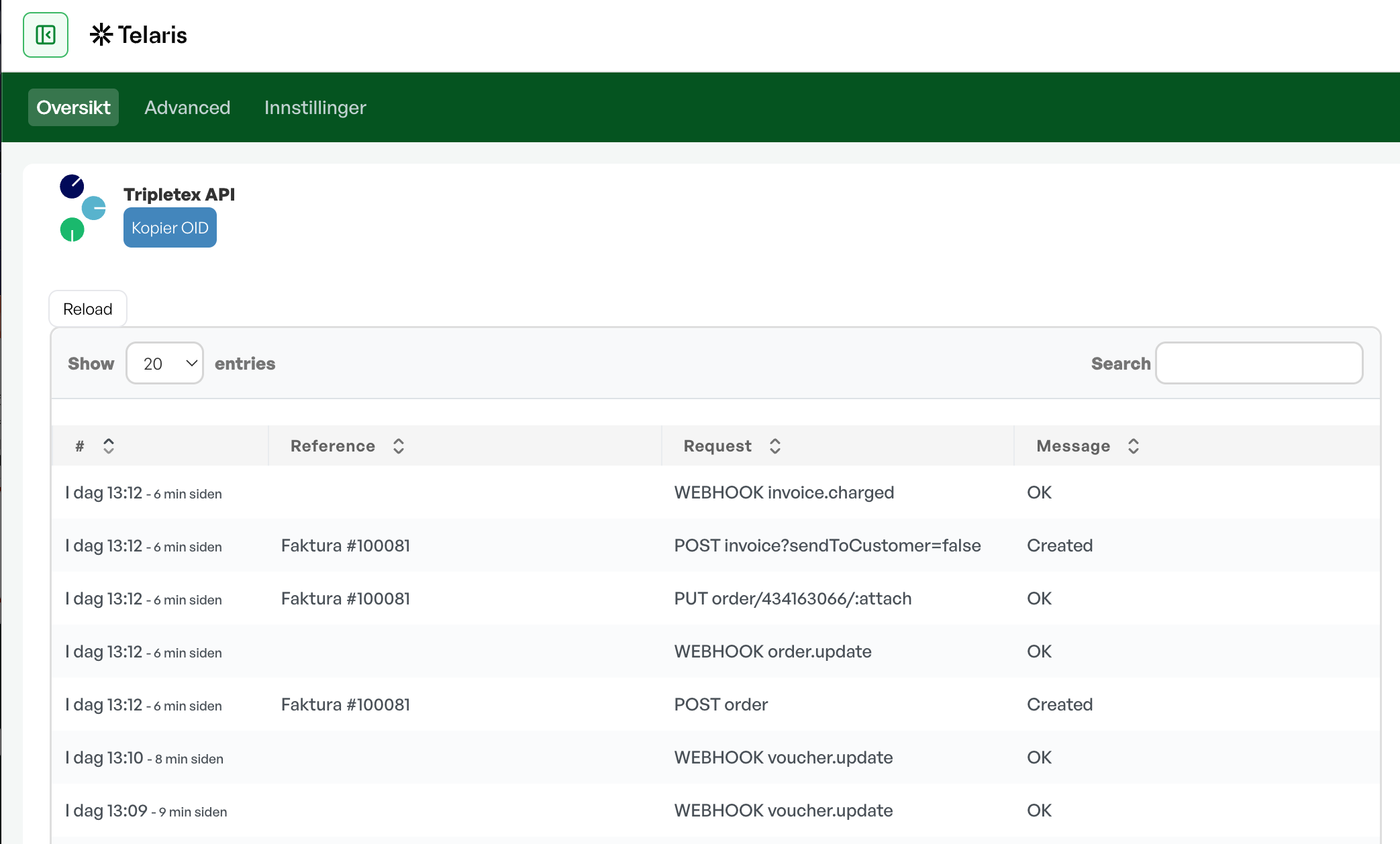
For control over error messages and flow in the integration, go toInnstillinger → Integrasjonsinnstillinger → Tripletex API.
ChooseTripletex APIin the drop-down menu. This shows all activity in the integration. The error message is shown in the "Message" field.

Review of common errors
Below you find an explanation, cause, and solution for the most common errors related to accounting export and payment import to Tripletex.
Guide: Tripletex – AccountingGuide: Batch export
Account not found in Tripletex
The error typically appears as:
«Account X was not found in [integration name]»
This means the account number used from Telaris does not exist in the chart of accounts in Tripletex.
The Tripletex integration uses automatic account mapping based on account number. There is no manual mapping table between Telaris and Tripletex. The account number from the product class in Telaris must therefore exist with the same number in Tripletex.
Common causes:
The product class in Telaris has the wrong account number
The account does not exist in Tripletex
The zero-VAT account is missing in Tripletex
Partner or factoring account is missing
A negative sales line uses a purchase account that does not exist in Tripletex
How to solve the error:
Find the invoice line or posting that fails in the export batch.
Check the product and the product class in Telaris.
Check which account the product class uses.
Open the chart of accounts in Tripletex and check that the same account number exists there.
Add the account in Tripletex, or change the account number in Telaris so that it matches Tripletex.
Also check the VAT setup on the account in Tripletex. Telaris does not send the VAT rate or VAT code directly. VAT is inherited from the VAT type configured on the account in Tripletex.
Guide: Product classesGuide: Chart of accountsGuide: Payment types
NOTE: The account numbers in Telaris and Tripletex must be identical. If the account is missing in Tripletex, the export will fail.
Payment type not found
The error typically appears as:
«Payment type not found»
This means Telaris cannot find a valid payment type mapping for the transaction type and currency to be exported to Tripletex.
Tripletex has its own payment types, for example bank, card, or cash. Telaris has its own transaction types. These must be linked via the payment type mapping in the Tripletex integration.
Common causes:
Payment type mapping is not configured
The transaction type exists in Telaris but is not linked to a payment type in Tripletex
Mapping is missing for the relevant currency
The Tripletex payment types have not been fetched or updated
How to solve the error:
Go toInnstillinger → Integrasjonsinnstillinger → Tripletex API.
Open the payment type mapping.
Find the Telaris transaction type that fails, for example cash, card, or bank.
Link the transaction type to the correct payment type in Tripletex.
Check that the correct currency is set.
Save and run the export again.
If no mapping exists for the specific currency, the system tries to use the mapping for the default currency. If that does not exist either, the export fails.
NOTE: Payment export requires a valid payment type mapping. Without it, Telaris does not know which Tripletex payment type to use.
Payment is not imported back to Telaris
When Invoice Payment Sync is enabled, Telaris checks Tripletex daily for paid invoices and imports new payments back to Telaris.
If a payment is registered in Tripletex but does not appear in Telaris, this is usually because payment import is not enabled, the invoice is not within the search period, or the invoice does not have a valid integration reference.
Typical flow:
Invoice is created in Telaris.
Invoice is exported to Tripletex.
Payment is registered in Tripletex.
A daily background job checks payment status.
The payment is imported to Telaris and accounts receivable is updated.
Common causes:
Module: Invoice Payment Sync is not enabled
The daily background job has not run yet
The invoice has not been exported from Telaris to Tripletex
The invoice is missing an integration reference
The invoice is outside the period that is checked
The payment is registered on a different invoice in Tripletex
How to troubleshoot:
Go toInnstillinger → Integrasjonsinnstillinger → Tripletex API.
Check thatModule: Invoice Payment Syncis enabled.
Check that the invoice has actually been exported from Telaris to Tripletex.
Check that the invoice has an integration reference in Telaris.
Check that the invoice is open or paid in Tripletex.
Wait until the daily background job has run, or check the job/log if available.
The payment import fetches open invoices from Tripletex with an invoice date within the last 3 years and up to 90 days into the future. Invoices outside this interval are normally not checked.
If the invoice is partially paid, the payment should also be importable. Telaris compares payment status in Tripletex with the status in Telaris and imports new payments when there is a difference.
NOTE: Payments are not imported in real time. The import happens via adailybackground job when Invoice Payment Sync is enabled.
Summary and further troubleshooting
For errors in Tripletex Accounting, you should always start by checking the export batch, the synchronisation log, and the integration settings.
In short:
If an account is missing: check the product class and chart of accounts in Tripletex.
If a payment type is missing: check the payment type mapping.
If a payment does not come back: check Invoice Payment Sync, the integration reference, and the daily import job.
If the error is not solved with the steps above, check the synchronisation log for a more detailed error message from the Tripletex API.
Tip: Many errors are due to missing basic setup. Always check that the Tripletex API integration is active, that the accounting module is configured, and that the relevant mappings exist.

Was this article helpful?
That’s Great!
Thank you for your feedback
Sorry! We couldn't be helpful
Thank you for your feedback
Feedback sent
We appreciate your effort and will try to fix the article