Customer and supplier sync - how two-way synchronisation works
Understand how customers and suppliers are kept synchronised between Telaris and Tripletex.
TABLE OF CONTENTS
Introduction
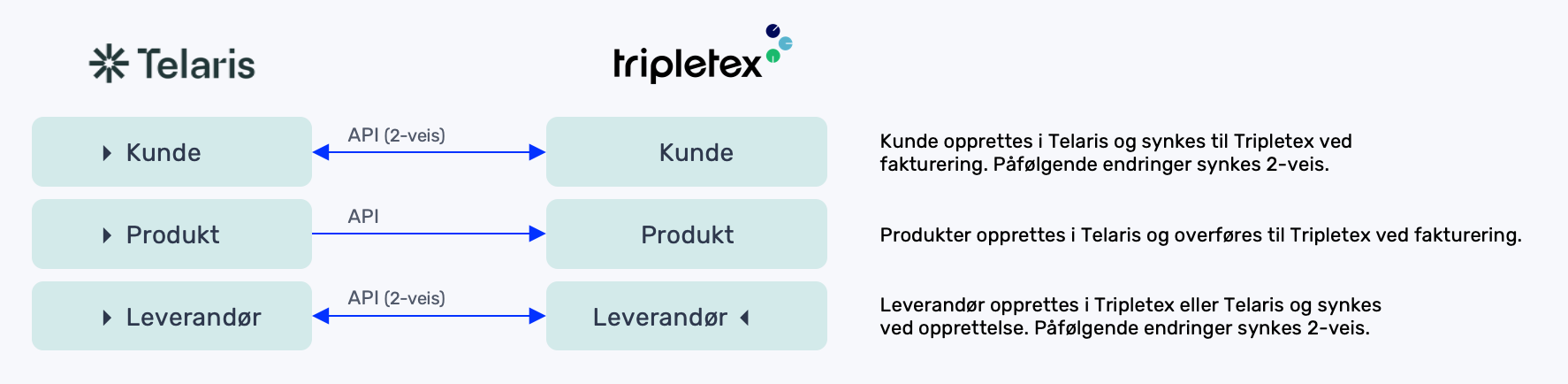
Customers and suppliers are synchronised between Telaris and Tripletex to ensure that both systems use the same data.
The synchronisation is two-way, but behaves differently depending on where the change occurs.
Tip: Think of synchronisation as “changes flow from where they happen”.
Overview of synchronisation
The synchronisation works differently depending on direction.
Changes from Telaris
When a customer or supplier is updated in Telaris:
- Only changed fields are sent to Tripletex
- Existing records are updated
For suppliers:
- Created automatically in Tripletex if they do not exist
For customers:
- Created in Tripletex on invoice export
Customers are not created automatically in Tripletex when saved in Telaris, only when an invoice is transferred. Existing customers and suppliers have changes applied in Telaris <-> Tripletex.
Changes from Tripletex
Tripletex sends a webhook on changes:
- Customers are only updated if they are already linked
- Suppliers are updated and imported automatically
Result:
- New suppliers → created in Telaris
- New customers → not imported automatically
NOTE: Customers do not flow in automatically from Tripletex. Telaris is the master of customer data.
Which fields are synchronised
The following fields are synchronised both ways:
- Name
- Customer number / supplier number
- Organisation number
- Email and invoice email
- Phone
- Address
- Currency
- Language
Only changes are sent, not the whole record.
Common synchronisation errors
If synchronisation does not work, check:
- Link missing (no integration reference)
- Customer number does not match
- Webhook does not work
- The initial initialisation has mis-linked customers or suppliers
NOTE: A missing link with a reference from Tripletex in Telaris is the most common reason data is not updated.

Was this article helpful?
That’s Great!
Thank you for your feedback
Sorry! We couldn't be helpful
Thank you for your feedback
Feedback sent
We appreciate your effort and will try to fix the article