Tripletex – Project synchronisation
Tripletex – Project synchronisation exports projects from Telaris to Tripletex and keeps project information up to date between the systems.
The module is used to ensure that projects exist in Tripletex for invoicing, payroll, accounting, and reporting.
TABLE OF CONTENTS
- Tripletex – Project synchronisation
- Tripletex – Project synchronisation – Introduction and setup
- Tripletex – Project synchronisation – Overview of project sync
- Tripletex – Project synchronisation – Troubleshooting
Tripletex – Project synchronisation – Introduction and setup
Project synchronisation is used when projects are created and maintained in Telaris but should also exist in Tripletex.
The synchronisation goes only one way:Telaris → Tripletex.
Projects are created and updated from Telaris. Changes made directly in Tripletex are not imported back to Telaris.
To use the module, the following must be in place:
The Tripletex API integration must be active and installed
Module: Projectsync must be enabled
The object type in Telaris must have «Is Project» enabled
Employees and departments should be synchronised with Tripletex
Project synchronisation is used together with:
Tripletex – Accounting
Tripletex – Payroll export (Optional)
The order module
Tip: Projects should always be created in Telaris first. Creating them directly in Tripletex can lead to duplicates because the system does not match existing projects automatically.
Tripletex – Project synchronisation – Overview of project sync
Projects are exported automatically from Telaris to Tripletex when they are saved, updated, or referenced from an order or invoice.
Typical workflow:
Project is created in Telaris
The project is exported to Tripletex
The project gets an integration reference between the systems
Changes to the project are synchronised onward to Tripletex
Invoices, vouchers, and payroll can be linked to the project in Tripletex
When project synchronisation is active, projects can be included automatically on invoices, vouchers, and payroll transactions exported to Tripletex.
How projects are identified
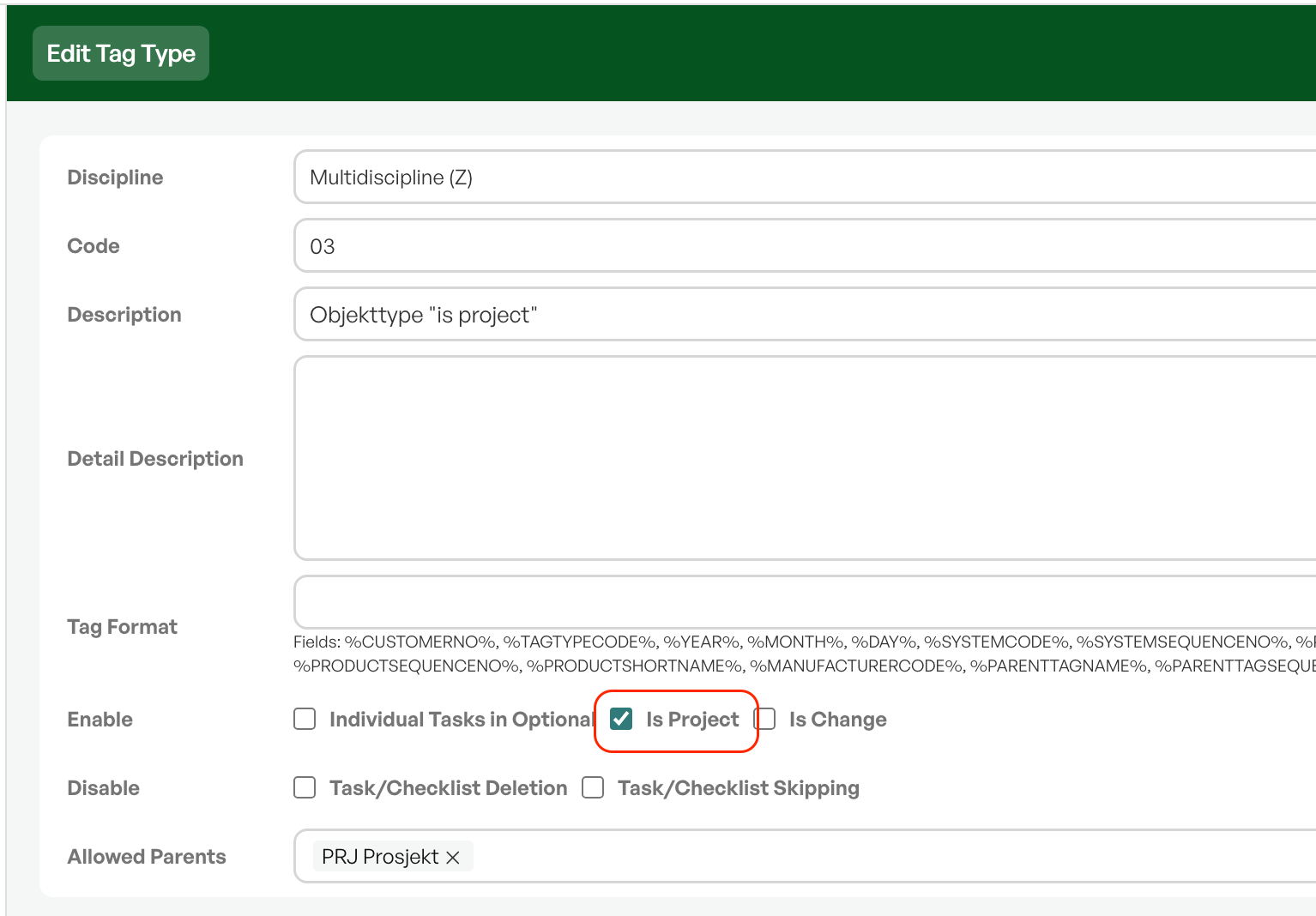
Projects in Telaris are objects (Tags/individuals) where the object type has the checkboxIs Projectenabled.
Only objects with this setting are treated as projects when synchronising to Tripletex.
To configure this:
Open the object type in Telaris
Enable «Is Project»
Save
Objects without this setting are not exported as projects.
NOTE: Projects that already exist in Tripletex are not automatically linked to projects in Telaris.
Automatic creation and update
Projects are exported to Tripletex in two ways:
On save:existing projects are updated when they are saved in Telaris
On reference:projects are created automatically when they are used on an order or invoice
When a project is already linked to Tripletex, the system compares local and external fields and sends only changed values.
If the project does not exist in Tripletex, it is created automatically.
The order module can also trigger project creation automatically when an order is linked to a project.
Tip: Projects do not need to be exported manually. The system automatically tries to create projects on first use.
Fields that are synchronised
The following project information is synchronised between Telaris and Tripletex:
Project number
Project name
Description
Comment
Start date
End date
Project manager
Department
Customer
The field mapping between the systems is shifted:
The name in Telaris is used as the project number in Tripletex
The description in Telaris is used as the project name in Tripletex
This is intentional because the project number is stored in the name field in Telaris.
When exporting the project manager, a fallback is used if the manager does not exist in Tripletex:
The project's manager
The integration's owner
The API token owner
NOTE: Changes made directly in Tripletex are not synchronised back to Telaris.
Internal and external mode
Projects can be exported as internal or external projects in Tripletex.
This is controlled by the settingExport Modein the Tripletex integration.
Possible modes:
Internal:used for internal cost projects
External:used for customer projects and billable projects
The mode is only used at the first export of the project.
Existing projects keep their original mode even if the setting is later changed.
NOTE: Export Mode only affects new projects. Existing projects are not automatically updated from internal to external or vice versa.
Projects and accounting export
When project synchronisation is active, projects can be included automatically on:
Invoices
Vouchers
Payroll transactions
On accounting export, a license in Telaris affects how projects are handled:
With a license:projects are created automatically on voucher export
Without a license:only existing project links are used
Telaris must enable the license, often done during the onboarding phase
Tip: Use project synchronisation together with accounting export and payroll export for full project tracking in Tripletex.
Tripletex – Project synchronisation – Troubleshooting
Common problems with project synchronisation are usually due to a missing project link, projects that already exist in Tripletex, or missing project configuration in Telaris.
Common errors:
«Project is not found or deleted»– the project does not exist or is deleted in Telaris.
«Export Project Error»– the project could not be created in Tripletex. Common causes are a duplicate project number or a missing required field.
Always check:
That Module: Projectsync is enabled
That the object type has «Is Project» enabled
That the project exists in Telaris
That the project manager is linked to Tripletex
That the project does not already exist in Tripletex with the same number
Known limitations:
Projects are synchronised only one way (Telaris → Tripletex)
There is no import of projects from Tripletex
Existing Tripletex projects are not linked automatically
Duplicates can occur if the same project is created in both places
Project budgets and project tasks are not synchronised
NOTE: Project synchronisation does not replace project management in Tripletex. The module only ensures that project information is exported and can be used in other Tripletex modules.

Was this article helpful?
That’s Great!
Thank you for your feedback
Sorry! We couldn't be helpful
Thank you for your feedback
Feedback sent
We appreciate your effort and will try to fix the article