Tripletex – Supplier invoice approval
Tripletex – Supplier invoice approval lets users approve supplier invoices from Tripletex directly in Telaris.
The module imports supplier invoices, creates approval tasks, shows the invoice PDF, and sends approval, rejection, or forwarding back to Tripletex.
TABLE OF CONTENTS
- Tripletex – Supplier invoice approval
- Tripletex – Supplier invoice approval – Introduction and setup
- Tripletex – Supplier invoice approval – Overview of the approval flow
- Tripletex – Supplier invoice approval – Troubleshooting and common errors
Tripletex – Supplier invoice approval – Introduction and setup
Supplier invoice approval is used when supplier invoices are registered in Tripletex but should be approved by users working in Telaris.
Invoice approval means checking and confirming that a supplier invoice is correct before it goes on to payment. This can be, for example, checking the delivery, amount, account allocation, project, or purchase order.
In Telaris, the term approval is used for the whole process. In the approval dialog, the user chooses between the actionsApprove,RejectorAdd recipient.
For the module to work, the following must be in place:
The Tripletex API integration must be active and installed
Module: Invoice Approval must be enabled in the Tripletex API integration
Suppliers must be synchronised between Telaris and Tripletex
Approvers must be linked between personnel in Telaris and employees in Tripletex
The approval flow must be configured in Tripletex
Tip: The approval flow is controlled in Tripletex. Telaris shows and processes the tasks but does not decide who should approve or in which order.
Tripletex – Supplier invoice approval – Overview of the approval flow
When a supplier invoice is added for approval in Tripletex, it is automatically imported to Telaris. There, approval tasks are created for the users who should process the invoice.
Typical flow:
Supplier invoice is registered in Tripletex
The invoice is added for approval in Tripletex
Tripletex sends a webhook to Telaris
Telaris imports the invoice and creates approval tasks
The approver opens the task in Telaris
The approver checks the invoice, PDF, account allocation, and any purchase order
The approver approves, rejects, or forwards the invoice
The result is sent back to Tripletex
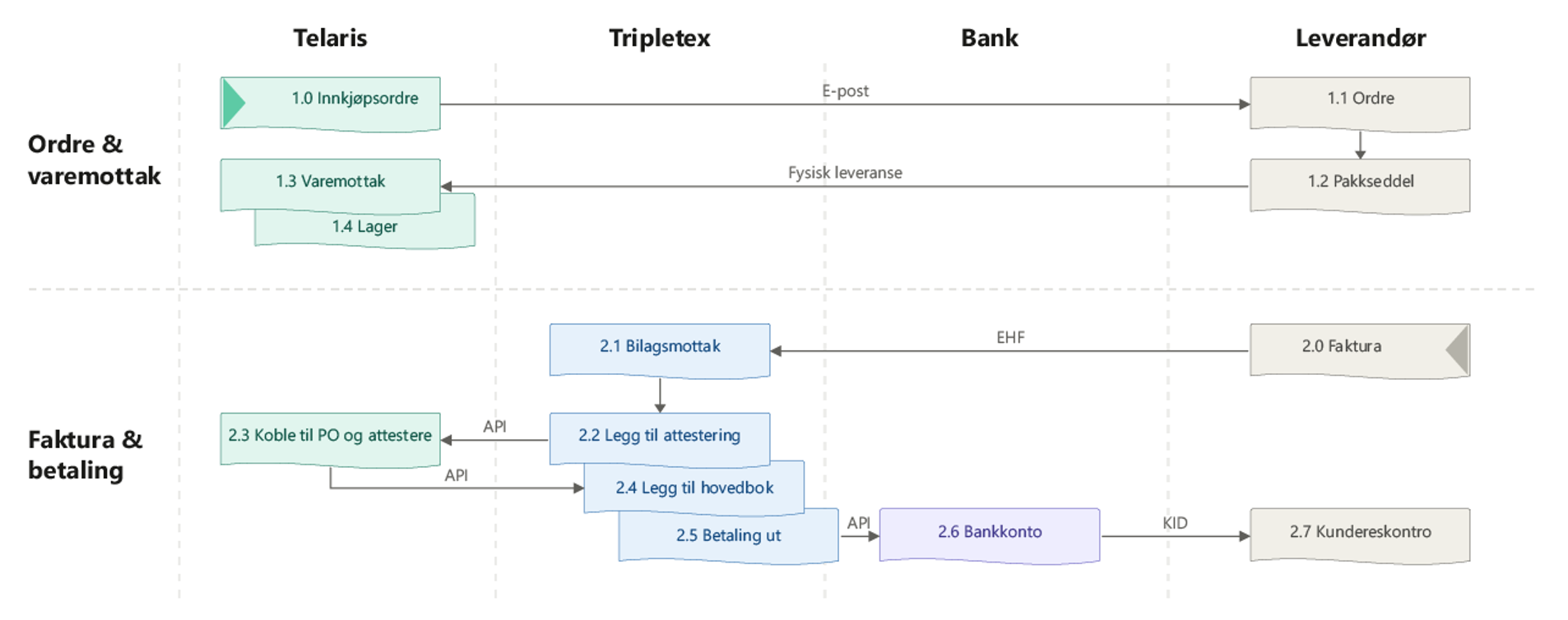
Note: Suppliers and employees must be linked between Telaris and Tripletex before approval tasks can be created correctly.
Import of supplier invoices
Supplier invoices are imported from Tripletex to Telaris automatically.
Import happens primarily via webhook in real time when a supplier invoice is created or updated in Tripletex. In addition, a daily background job runs as a safety net if the webhook has not captured the invoice.
The following information is imported:
Invoice number
Supplier
Amount
Due date
Approval list
Account allocation information
All supplier invoices added for approval in Tripletex are imported to Telaris, as long as the supplier exists in Telaris and is linked via an integration reference.
NOTE: Supplier invoices for suppliers that do not exist or are not linked in Telaris are not imported.
Approval tasks in Telaris
For each person waiting to approve an invoice, Telaris creates an approval task.
The task appears in the user's task list and is linked to the supplier invoice.
Tripletex's approval flow determines who should approve. Telaris creates one task per approver awaiting processing.
When an approver processes the invoice, the task is marked as completed. If the invoice is deleted or cancelled in Tripletex, the task is marked as not applicable.
NOTE: If an approver is not linked to personnel in Telaris, no approval task is created for that person.
Approve, reject, or forward
When the approver opens the supplier invoice in Telaris, the invoice can be processed in the approval dialog.
The dialog has three actions:
Approve:The user approves the invoice. A comment is optional.
Reject:The user rejects the invoice. A comment is required.
Add recipient:The user forwards the invoice to a new approver.
On approval, the result is not necessarily sent to Tripletex immediately. Only when all approvers in Telaris have approved is a single combined approval sent back to Tripletex.
On rejection, the rejection is sent to Tripletex immediately together with the comment.
On forwarding, a new approver is added in Tripletex and in Telaris. The user can also choose to remove themselves from the approval list.
NOTE: A comment is required when rejecting. Without a comment, the invoice cannot be rejected.
PDF view and timeline
The invoice PDF from Tripletex is shown directly in the side panel in Telaris.
The PDF is fetched from Tripletex at first view and stored locally in Telaris for faster access later. The view supports zoom, fit to page, rotation, and download.
The side panel also shows a timeline for the supplier invoice.
The timeline can show:
Approval, rejection, and forwarding done in Telaris
Comments from approvers in Telaris
Status changes from Tripletex
Links to purchase orders
Link to purchase order
Supplier invoices can be linked to one or more purchase orders directly from the side panel in Telaris.
Purchase orders are shown in a searchable table, and the approver can tick the relevant orders. The link is logged in the timeline.
The approval button shows different text depending on whether the invoice is linked to a purchase:
Approve w/o purchase...is shown when no purchase order is linked
Approve...is shown when at least one purchase order is linked
Both buttons open the same approval dialog.
Tip: Use the link to a purchase order to document that the invoice belongs to the correct purchase before it is approved.
Tripletex – Supplier invoice approval – Troubleshooting
If supplier invoices are not imported or cannot be approved, this is usually due to a missing supplier link, missing personnel link, or an error in the approval flow in Tripletex.
«Failed to approve the invoice»– Tripletex rejected the approval. Check that the invoice is still waiting for approval.
«Failed to reject the invoice»– Tripletex rejected the rejection. Check the status of the invoice in Tripletex.
«Failed to add new recipient in Tripletex»– forwarding failed. Check that the recipient is linked between Telaris and Tripletex.
«You need to write a comment in order to deny»– a comment is missing on rejection.
«You are not in the approver-list»– the user is not an approver for the invoice.
«The supplier invoice was not found»– the supplier invoice does not exist in Telaris.
«The approval task was not found»– the task does not exist, is completed, or is no longer applicable.
«The Supplier Invoice Source is unknown or disabled»– the integration or module is not active.
Always check:
That the Tripletex API integration is active
That Module: Invoice Approval is enabled
That the supplier exists in Telaris and is linked to Tripletex
That the approver exists as personnel in Telaris and is linked to Tripletex
That the invoice is actually waiting for approval in Tripletex
That webhooks are active
NOTE: Telaris does not replace Tripletex's approval flow. The flow is defined in Tripletex, while Telaris acts as the working surface for approval.

Was this article helpful?
That’s Great!
Thank you for your feedback
Sorry! We couldn't be helpful
Thank you for your feedback
Feedback sent
We appreciate your effort and will try to fix the article