Delete individual order lines
Guide for deleting individual order lines.
How to
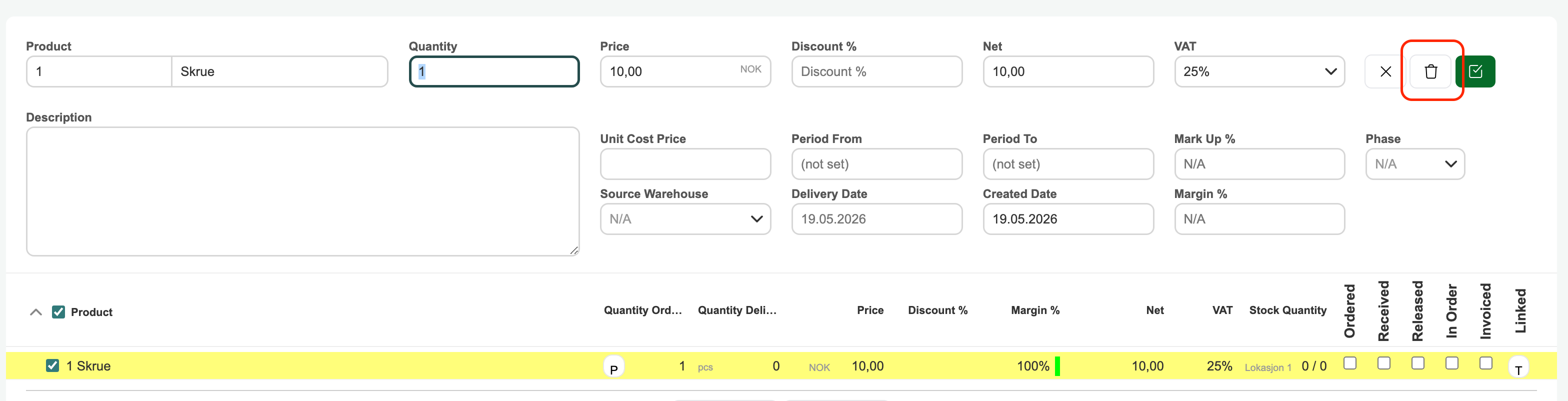
Select the order line and click the 'trash can' icon. You will then receive a prompt asking if you want to delete — clicking 'OK' moves the order line to the order's bin. It is also possible to select multiple lines and use the "With selected, do" function at the bottom left of the page and choose 'delete'.
See the link to the guide below the image to restore a deleted order line.
Guide: Restore deleted order lines
Was this article helpful?
That’s Great!
Thank you for your feedback
Sorry! We couldn't be helpful
Thank you for your feedback
Feedback sent
We appreciate your effort and will try to fix the article