Product card - Options and sales display
Details for the product number and options that can be added to the product
TABLE OF CONTENTS
Options and sales display
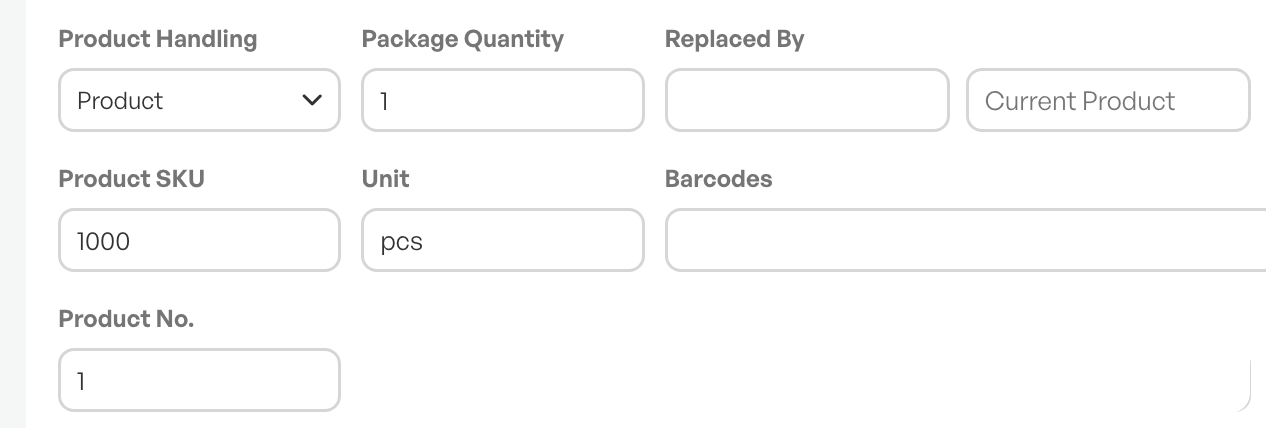
PNr. and Telaris PNr.
The product's product number and assigned Telaris product number.
See the separate guide in the link below.
Guide: Product number
Package size
Used for products sold in package sizes. For example, products sold in two-packs, etc.
NOTE: Package size must not be confused with 'Quantity per unit purchased'. See the separate guide:F/D-Pak
Replaced by
Field for setting a replacement product number. The field works so that if a replacement product is set, the original product is used in orders until it is out of stock, after which the replacement product is used.
Guide: Replacement products
Labels
For sorting and categorising the product. Etiketter can be used to find a group of products in the product search.
Unit
Counting unit shown in orders.E.g. L, M, pcs, Stk
EAN barcode
The barcode used in sales, for example in a point-of-sale solution.
Product structure
Option for the product's structure.
Guide: Product structure

Was this article helpful?
That’s Great!
Thank you for your feedback
Sorry! We couldn't be helpful
Thank you for your feedback
Feedback sent
We appreciate your effort and will try to fix the article