The purchase planner
The purchase planner is a tool that analyses order data and stock settings to generate purchase suggestions, ensuring efficient goods flow and inventory management.
TABLE OF CONTENTS
Introduction
The purchase planner in Telaris creates purchase suggestions from suppliers based on setup such as inventory management, order statuses and minimum purchase.
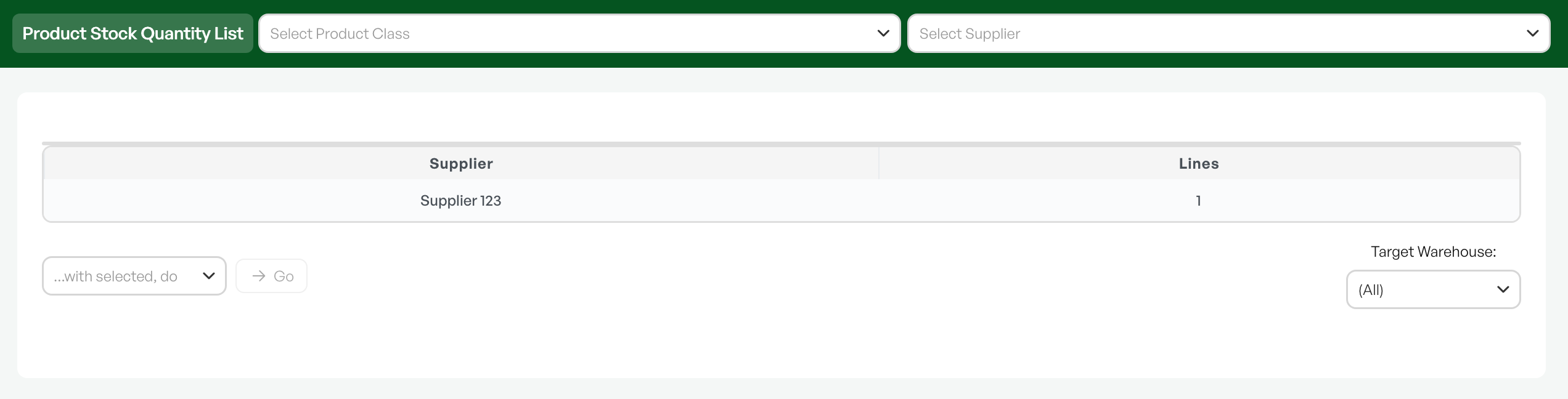
Based on the setup, the planner can keep track of which products you need at any given time.
From the purchase planner you generate a purchase order (PO), and avoid going via active orders and checking each product manually to see the stock level.
Note: The purchase planner creates purchase suggestions based on the configured settings. All purchases should be checked before ordering.
Criteria for use
To use the purchase planner it is important to have setup for:
- Order statuses
- Minimum stock
- Minimum purchase
- Inventory management of the product, purchasing allowed
- With several active warehouses, orders must be locked to a warehouse, either by the user being linked to a warehouse, or by selecting manually in the order. With only one active warehouse, this is selected automatically.
Based on these choices, the purchase planner sees your needs and suggests products that can be purchased.
Supplier and catalogue
Products are grouped in the purchase planner per supplier, in the same way as when you create purchases manually in Telaris.
All products shown in the purchase planner must be linked to a supplier via a catalogue, in the same way as ordinary purchases in Telaris.
Guide: Purchasing
Warehouse selection
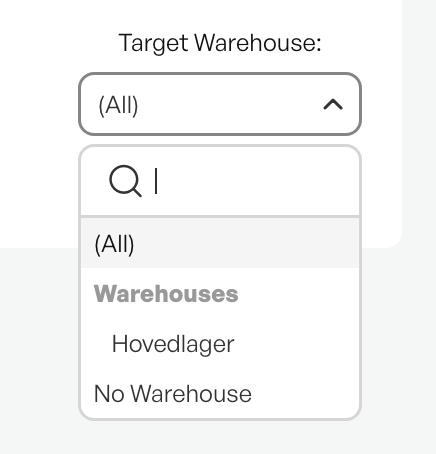
The purchase planner looks across warehouses, and you can choose which warehouse to view in the purchase planner.
This is shown so that you can choose to view all warehouses, or a specific single warehouse. Products located in several warehouses are then shown in their separate warehouses, or under the 'All' warehouses option.
By filtering on 'All' and going into the relevant supplier, you see in the list what should be ordered to which warehouse, and one purchase is created per warehouse.

Was this article helpful?
That’s Great!
Thank you for your feedback
Sorry! We couldn't be helpful
Thank you for your feedback
Feedback sent
We appreciate your effort and will try to fix the article