Importing purchases
If you need to bring in old purchases of a certain size from a previous system, you can import the purchases into Telaris directly.
TABLE OF CONTENTS
Formatting the file
The file should be prepared in Excel beforehand. In the example below, you can see how it will look for importing 3 products.
You can of course add many more products.
The blankcolumn header on the first and last column must remain, and the fields below must be empty.
You can find the base file by going to "Logistics" and selecting "Import" in the side menu, then clicking "sample sheet".
blankcolumn | productsku | productname | price | unit | quantity | retailprice | currency | suppliersku | barcodes | blankcolumn |
| 412455 | Hammerbolt 4´´ | 220,00 | Stk | 20 | 440 | NOK | 412455 |
|
|
| 4234234 | Anode med pigger | 60,00 | Pk | 5 | 450 | NOK | 4234234 |
|
|
| 423423444 | 5krone-holder | 840,00 | Pk | 5 | 900 | NOK | 423423444 |
|
|
When you have finished preparing the file, save it as CSV UTF-8.
Note: it is possible to leave fields such as "price" and "retailPrice" empty. In that case, the purchase order is created with the current prices you have in your system for these products.
Importing the file
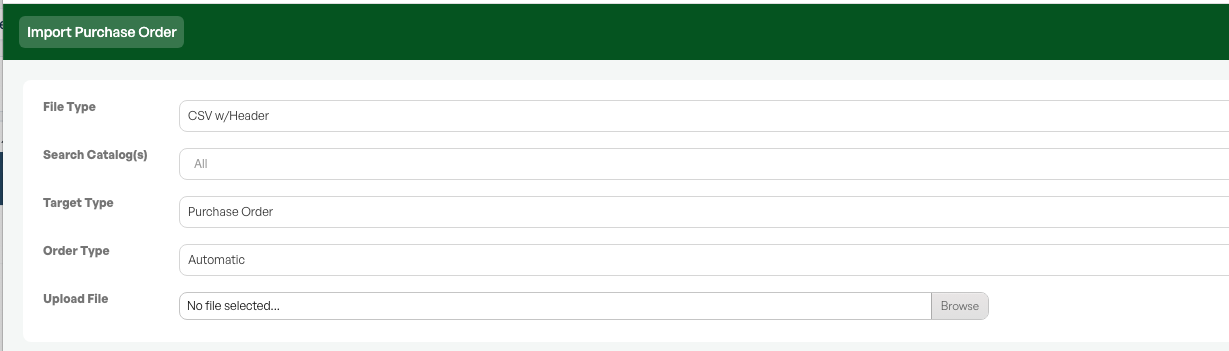
Go to the side menu and select "Logistics" then "Import".
The file type should be 'CSV W/header'.
Target type should be 'Purchase order'.
Then choose the purchase order type you want it to appear as.
Upload the file and click 'Analyze'.
You will now get a list of all the products you are trying to import into the purchase order.
It is important to scroll through this. Products marked in «red» were not found in the catalogue by the system, and in this case products will be created here based on the info you put in the file.
NOTE: we do not recommend bringing in the products marked in red, as these will get errors in, among other things, the product name.
If you choose to bring in these products even though you do not already have them in the catalogue, it may be wise to go in and post-process them to make sure everything is correct in that case.
Purchase orders are then created based on the products. X number of purchases are created, where X is the number of suppliers (since a purchase can only apply to 1 supplier at a time).

Was this article helpful?
That’s Great!
Thank you for your feedback
Sorry! We couldn't be helpful
Thank you for your feedback
Feedback sent
We appreciate your effort and will try to fix the article