Order statuses - Overview, creating and editing
Order statuses are used in work processes. Telaris has standard order statuses, and you can also create your own custom statuses. Editing and administering order statuses is for system administrators in Telaris
TABLE OF CONTENTS
The purpose of order statuses
Order statuses are a process and organisation tool for creating acustomworkflow
Creating and administering order statuses
Information
To make changes or create new order statuses, go via 'Settings -> Order statuses'
You then reach an overview of all order statuses and see the settings per status
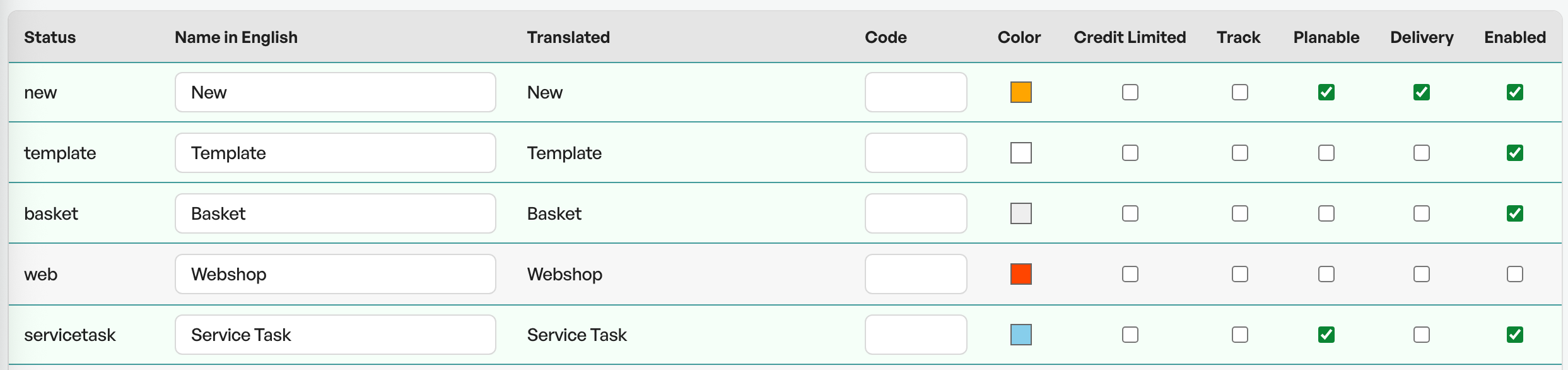
Telaris has a number of standard order statuses. Many are linked to automation and functions. A standard Telaris order status stands out by having a name in the 'Status' column. Your own statuses get the name 'Custom'
Examples:
Open, offer, approved, approval are examples of standard order statuses in Telaris. These should only be used as they are set up by default.
Your own statuses are shown as 'Custom' in the list.

Moving and sorting order statuses
You can also change the sort order of order statuses by 'Drag n drop' of the order statuses in the settings.
This changes the order of the statuses in the order view.
Settings
Order statuses have six settings you can turn on and off as needed:
Credit limited
Enables the credit block on the order statuses. See the separate article on credit block
Track
N/A
Planable
Orders with this order status can be added to the order planner
Delivery
Orders with this order status affect the purchase planner
Active
Whether the order status should be in use or not. Removing the active status makes the order status unselectable
Colour
The colour choice is reflected in the order list. A blue order status is shown blue in the overview

Creating new order statuses
To create a new order status, click "Add new" at the bottom of the page. You then get the option to create an English name for the database. The name can be translated to Norwegian in the translation tool.
You are free to choose the settings you want for the order status.
Note: New custom order statuses have no automation attached to them, and will not automatically appear in KPI charts etc. Contact Telaris support for assistance

Was this article helpful?
That’s Great!
Thank you for your feedback
Sorry! We couldn't be helpful
Thank you for your feedback
Feedback sent
We appreciate your effort and will try to fix the article