The product list
A product overview with filtering options and search gives businesses an efficient way to find specific items quickly, saving time and increasing productivity.
TABLE OF CONTENTS
Navigation
The product list is found via the side menu or via a shortcut from the dashboard.
Overview
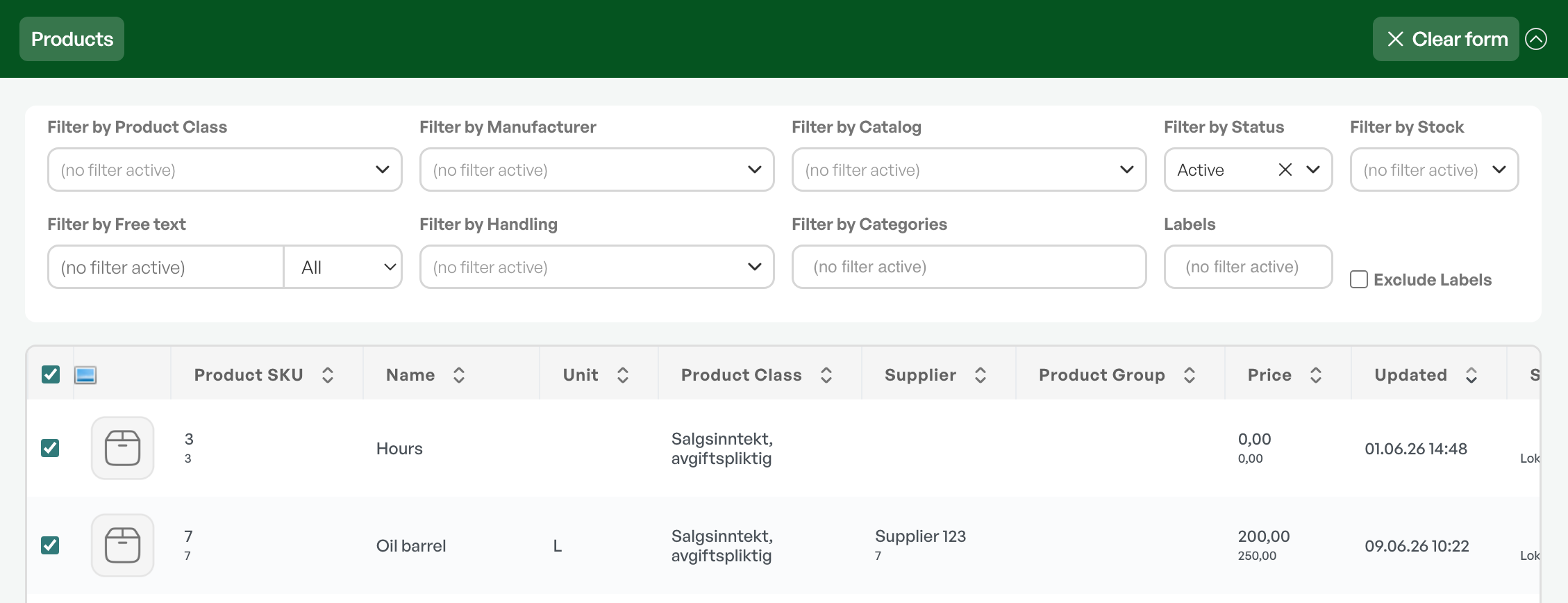

The product list shows an overview of all products in list form with information about product number, name, unit, product class, supplier, product category, price, and stock.
At the bottom of the overview, the number of search hits is shown.
Filtering and search
Free-text search
Free-text search that searches by name, product number, and product category. You can also choose specific fields to search via the drop-down menu in the field.

Product class
Restriction by product class; this finds all products within a specific product class.

Guide: Product class
Product structure
Restriction to products within a specific product structure, such as collection product, line expansion, etc.

Guide: Product structures
Manufacturer
Restriction to all products from a specific manufacturer; searches for all products belonging to the manufacturer across catalogues.

Catalogue
Restricts to all products within a specific supplier catalogue.

Guide: Catalogues
Category
Restricts the products to specific categories.

Guide: Product categories (TBA)
Labels
Restriction by labels. Labels are set on the product card and can be filtered from the product list.

Guide: Product labels (TBA)
Stock status
Restricts to products that are in stock, not in stock, inbound to stock, and neither inbound nor in stock.

Filtering by warehouse
If you have only one warehouse, the default location is shown automatically.
If you have several warehouses, the default location is shown on products that have stock at the selected warehouse.
Status
By default, the product overview shows all active products. That is, products that have not had their status changed to inactive.
Inactive products must be searched for by restricting on status.

Exporting selected products to Excel
You can export a search of products to an Excel file.
See the separate guide in the link below.
Guide: Exporting the product list
Was this article helpful?
That’s Great!
Thank you for your feedback
Sorry! We couldn't be helpful
Thank you for your feedback
Feedback sent
We appreciate your effort and will try to fix the article